Optical Character Recognition Vs Intelligent Document Processing: 8 Major Differences
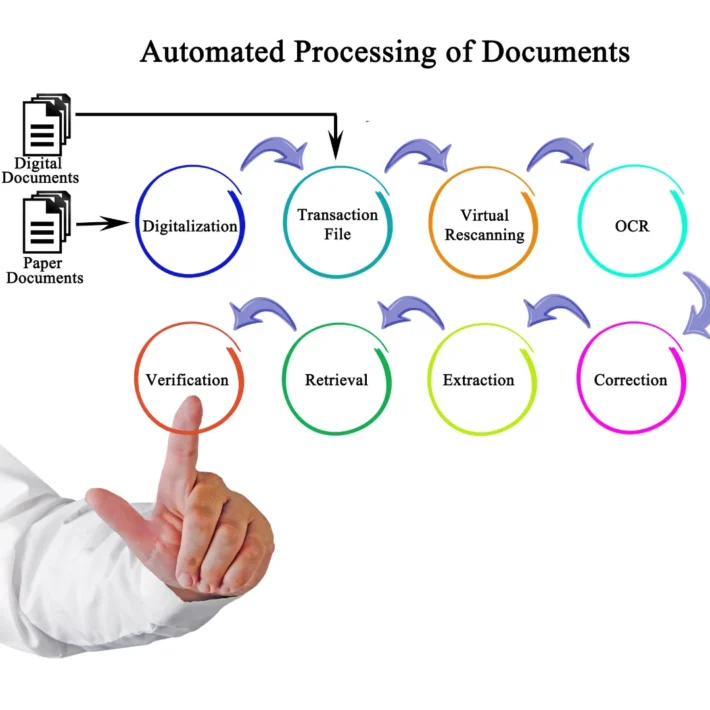
Optical Character Recognition (OCR) and Intelligent Document Processing (IDP) are two technologies widely used in digital document management. While both serve the purpose of digitizing and processing documents, they differ significantly in functionality, integration, and capabilities. Understanding these differences is crucial for businesses to select the right solution for their specific needs.
This article will explore the core concepts of OCR and IDP, highlight their distinct features, and provide a detailed comparison of the eight major differences between these two document processing solutions. By the end, you’ll have a comprehensive understanding of what each technology offers and how they can fit into various business scenarios.
What You’ll Learn:
- Definitions and benefits of OCR and IDP.
- Functionality and technology integration differences.
- Detailed analysis of data extraction capabilities and automation levels.
- Use cases of OCR and IDP in business environments.
- Insights on choosing the right solution for your organization.
Understanding Optical Character Recognition (OCR)
What is OCR Technology?
Optical Character Recognition (OCR) is a digital technology designed to recognize and convert text in physical documents into machine-readable text. It’s a widely used solution that helps organizations digitize their documents, making them searchable and editable in electronic formats. OCR is particularly beneficial for processing paper documents, PDFs, or any image-based files that contain text. By translating the visual content of a document into structured text data, it transforms scanned documents, images, or printed material into digital formats that can be indexed and analyzed.
One of the core advantages of Optical Character Recognition is its ability to make text within images usable. This is critical in industries such as banking, legal, and education, where large volumes of printed documents need to be digitized efficiently. OCR software can be used in various applications, from automating data entry to creating searchable archives of historical documents.
Typical Use Cases of OCR Technology:
- Digitizing Paper Records: Ideal for turning printed forms, invoices, and contracts into digital copies.
- Automating Data Entry: Extracts text from scanned images and inputs it into databases automatically.
- Creating Searchable Documents: Converts books, research papers, and other text-heavy documents into formats that support keyword searches.
Improve your Internal Processes.
How Does OCR Work?
OCR technology operates through a sequence of sophisticated steps that convert printed or handwritten characters into machine-encoded text. These steps include pre-processing, character recognition, and post-processing. Let’s delve deeper into each of these stages:
Step 1: Pre-Processing
Pre-processing prepares the scanned image for character recognition by enhancing its quality. The pre-processing stage involves several sub-processes that improve the accuracy of OCR. These include:
- Noise Reduction: Removes background noise and ensures that only the characters are highlighted.
- Binarization: Converts the image into a binary format (black and white) to simplify character detection.
- Skew Correction: Adjusts for any tilting or misalignment in the scanned document.
- Text Area Detection: Identifies the sections of the image that contain text, ignoring non-text elements like images and logos.
By cleaning up the document image and isolating the text, pre-processing ensures the OCR system can focus solely on the content that needs to be recognized, minimizing errors during the character detection phase.
Step 2: Character Recognition
The core of OCR is the character recognition stage, where the software analyzes the visual text data and converts it into machine-readable text. This involves two main techniques:
- Pattern Recognition: OCR compares the shapes of characters in the scanned image to a database of stored patterns. For example, it identifies the letter “A” by matching its shape against pre-defined templates.
- Feature Extraction: Instead of comparing full patterns, feature extraction breaks down each character into smaller components (such as lines, curves, and angles) and then reconstructs the character based on these features.
The software scans each character line-by-line, identifying letters, numbers, and symbols, and translating them into text. This step also handles variations in fonts and styles, making OCR adaptable to different document formats.
Step 3: Post-Processing
Post-processing is where OCR refines its results to produce a more accurate output. This step includes:
- Error Correction: Applies algorithms to identify and correct common recognition errors (e.g., mistaking “0” for “O”).
- Contextual Analysis: Uses language models to ensure that recognized words fit within the expected context.
- Formatting: Reconstructs the layout of the original document, ensuring that tables, lists, and paragraphs are properly aligned.
Benefits of OCR
The benefits of Optical Character Recognition extend beyond simple text conversion. Here’s a detailed look at the primary advantages:
- Faster Digitization
OCR significantly accelerates the process of converting physical documents into digital formats. A task that could take hours to complete manually can be done in seconds with OCR, making it ideal for businesses looking to digitize large volumes of paper records. - Increased Searchability
One of the most valuable aspects of OCR is the ability to make scanned documents searchable. By converting images into text, OCR allows users to perform keyword searches, making it easier to locate specific information within a document. - Improved Data Management
OCR eliminates the need for manual data entry, reducing the chances of human error. This not only streamlines data management but also enables faster retrieval and better organization of information. - Cost Savings
Automating text extraction with OCR reduces the need for manual labor, thereby cutting down on operational costs associated with data entry and document management. - Accessibility
OCR makes text available for screen readers, which is essential for creating accessible content for visually impaired users. It also allows older documents to be preserved and accessed electronically.
2. Understanding Intelligent Document Processing (IDP)
What is IDP Technology?
Intelligent Document Processing (IDP) is a comprehensive technology that goes beyond Optical Character Recognition. While OCR is limited to recognizing and converting text into digital formats, IDP takes it several steps further by understanding and interpreting the content within documents. IDP combines advanced technologies such as AI, machine learning (ML), natural language processing (NLP), and deep learning to analyze and extract complex data from various types of documents, including unstructured and semi-structured data.
IDP is used to automate more complex document workflows, such as validating the extracted information, categorizing documents, and even triggering downstream processes based on the document content. This makes IDP a valuable tool for businesses dealing with high volumes of diverse documents like invoices, contracts, and claims.
Typical Use Cases of IDP Technology:
- Invoice Processing: Automates the extraction and validation of invoice details, reducing manual work.
- Mortgage and Loan Applications: Streamlines the extraction of customer information from application forms.
- Contract Analysis: Identifies and extracts key clauses and terms from complex legal documents.
How Does IDP Work?
IDP integrates multiple technologies and employs a multi-step approach to process documents. Here’s a detailed breakdown of how IDP works:
Step 1: Data Ingestion
IDP accepts a wide variety of document formats, including PDFs, scanned images, emails, and handwritten forms. This flexibility allows organizations to process all types of documents through a single system. IDP uses OCR as one of its underlying technologies to extract text from images, but it extends this capability by understanding different document structures.
Step 2: Classification
Once the data is ingested, IDP classifies the document based on its content and structure. It uses machine learning algorithms to detect document types (e.g., invoices, contracts, forms) and categorize them accordingly. This step is crucial because different types of documents require different processing rules.
Step 3: Data Extraction and Validation
After classifying the document, IDP extracts the relevant data points based on predefined rules and the context of the document. For example, in an invoice, IDP will extract fields like “Invoice Number,” “Date,” “Total Amount,” and “Vendor Name.” The extracted data is then validated against business rules to ensure accuracy.
IDP’s data extraction is more sophisticated than traditional OCR because it understands the context and relationships between different data elements. This ensures that even complex data, such as tables or multi-line fields, is extracted correctly.
Step 4: Contextual Analysis
IDP applies Natural Language Processing (NLP) and machine learning models to interpret the document’s content. This step allows IDP to understand the semantic meaning behind the text. For instance, if the document mentions a legal clause, IDP can identify it as a “Force Majeure” clause based on the context, even if the exact term isn’t used.
This capability is what sets IDP apart from OCR. IDP doesn’t just extract text—it extracts meaningful information, which is critical for decision-making processes.
Step 5: Output and Integration
Once the data is extracted and analyzed, IDP converts it into usable formats such as structured databases, JSON, or XML files. It then integrates with downstream business applications, such as enterprise resource planning (ERP) systems, content management platforms, or robotic process automation (RPA) tools, to trigger automated workflows.
Benefits of IDP
The benefits of Intelligent Document Processing are extensive, particularly for organizations looking to automate complex document-based workflows. Here’s a deeper look into the key benefits:
- Higher Accuracy
IDP’s use of AI and machine learning allows it to extract data with higher accuracy, even from complex or handwritten documents. It adapts to different layouts and formats, reducing errors that are common in traditional OCR. - Contextual Understanding
IDP’s ability to apply contextual analysis means it understands the content’s intent. This is especially useful in legal, financial, or healthcare documents where the meaning behind the text is just as important as the text itself. - End-to-End Automation
IDP doesn’t stop at text extraction. It automates the entire document processing workflow, including classification, validation, and integration with other business systems. This reduces the need for manual intervention and speeds up processing times. - Scalability
IDP solutions can scale easily, making them suitable for enterprises with high document volumes. As the system learns from processing more documents, it becomes faster and more efficient. - Future-Proof Technology
IDP continuously improves over time as it learns from new data. This makes it a future-proof solution that evolves with changing business needs and document formats.
By combining AI, ML, and OCR, Intelligent Document Processing offers a sophisticated, scalable, and automated solution for organizations dealing with complex documents, setting it apart as the next generation of document automation tools.
3. Major Differences Between OCR and IDP
Optical Character Recognition and Intelligent Document Processing have their strengths and limitations. Here, we’ll break down the eight major differences between these technologies to give you a clearer picture.
Functionality
OCR focuses primarily on text extraction. It’s ideal for digitizing documents, making them searchable and editable. However, OCR lacks the ability to interpret the content’s context.
IDP, on the other hand, extends beyond text extraction. It can classify documents, extract complex data points, and understand the relationships between different elements. This makes IDP a more comprehensive solution for businesses dealing with diverse document types.
| Criteria | Optical Character Recognition | Intelligent Document Processing |
|---|---|---|
| Core Functionality | Text extraction | Text extraction + Contextual analysis |
| Document Understanding | Limited to basic text identification | In-depth contextual understanding |
| Use Cases | Digitizing documents | Comprehensive data processing and analysis |
Technology Integration
OCR traditionally uses a template-based approach, which means it requires predefined rules to recognize specific text patterns. This makes it less flexible when dealing with varied or unstructured data.
IDP, however, integrates AI, machine learning, and deep learning to adapt to new document layouts and learn continuously. This flexibility allows IDP to handle complex scenarios where document formats and content may change frequently.
| Criteria | OCR | IDP |
|---|---|---|
| Technology | Pattern recognition | AI, ML, NLP, Deep Learning |
| Template-Based | Yes | No |
| Learning Capability | Limited | Continuous learning and improvement |
Data Extraction Capability
OCR is effective in extracting text but struggles with complex data points, such as tables, graphs, or handwritten notes. It works best with structured data and is limited to raw text extraction.
IDP excels at extracting data from unstructured and semi-structured documents. It not only captures the text but also validates it using contextual cues, ensuring higher data accuracy.
| Criteria | OCR | IDP |
|---|---|---|
| Data Type | Structured | Structured, unstructured, and semi-structured |
| Contextual Validation | No | Yes |
| Handwritten Text | Limited support | Advanced support |
Complex Document Handling
OCR struggles with complex document layouts, such as forms, invoices, or multi-column texts. It requires manual setup for each new format, which can be time-consuming.
IDP, however, is designed to handle complex documents effortlessly. It can extract data from invoices, contracts, and legal documents, even if they have varied structures. This ability is crucial for industries like finance and healthcare, where document diversity is high.
| Document Types | OCR | IDP |
|---|---|---|
| Standard Forms | Yes | Yes |
| Invoices, Contracts | Limited | Full support |
| Varied Layouts | Requires manual setup | Automatic adaptability |
Automation Level
OCR offers basic automation by converting text into editable formats. However, it often requires manual verification and correction, especially when dealing with non-standard documents.
IDP provides end-to-end automation. It automates data extraction, classification, and validation, reducing manual intervention to a minimum. This results in faster processing times and fewer errors.
| Automation Level | OCR | IDP |
|---|---|---|
| Manual Intervention | Frequently needed | Minimal |
| Automation Scope | Limited to text conversion | Complete document processing |
Learning Capabilities
OCR is a static solution. It doesn’t improve over time unless manually reconfigured to handle new document formats.
IDP leverages machine learning algorithms to continuously adapt and improve its performance. As the system processes more documents, it learns and becomes more accurate, making it a future-proof solution.
| Criteria | OCR | IDP |
|---|---|---|
| Adaptability | Static, requires manual updates | Dynamic, self-learning |
| Long-term Efficiency | Decreases over time | Increases over time |
Use Cases in Business Environments
OCR is commonly used for tasks like digitizing books, creating searchable PDFs, and automating data entry from scanned documents.
IDP finds its use in more complex scenarios, such as processing mortgage applications, handling insurance claims, and automating invoice processing. It’s a go-to solution for industries dealing with high volumes of complex documents.
| Use Case Examples | OCR | IDP |
|---|---|---|
| Digitizing Books | Yes | No |
| Invoice Processing | Limited | Full support |
| Legal Document Management | No | Yes |
Output Quality and Insights
The output quality of OCR can vary based on the quality of the scanned documents and the complexity of the layout. OCR typically produces raw text output without any contextual insights.
IDP provides not only high-quality text extraction but also contextual insights that help businesses make data-driven decisions. This makes IDP a more powerful tool for scenarios where data interpretation is crucial.
| Criteria | OCR | IDP |
|---|---|---|
| Output Quality | Dependent on input quality | High accuracy regardless of input quality |
| Contextual Insights | No | Yes |
Choosing the Right Solution for Your Business Needs: A Final Thought on OCR and IDP Technologies
When it comes to choosing between OCR and IDP, the decision ultimately depends on the complexity of your documents and the level of automation you need. If your goal is to digitize simple documents or convert scanned text into editable formats, OCR may suffice. However, if you’re dealing with diverse document formats and need a solution that can understand, classify, and extract complex data with minimal manual intervention, IDP is the way to go.
Investing in IDP can bring higher accuracy, greater automation, and a future-ready approach to document processing, making it a strategic choice for businesses aiming to optimize their workflows and data management.